ラズパイのOSが上がるたびに色々と仕様変更があり
先駆者の記事の通りにはなかなかいかなくなってきているので、現時点でインストール~WifiAP化までのコマンドのメモです。
■本記事の前提
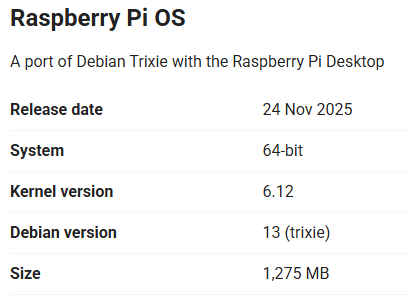
RaspberryPi 3B+
OS:Trixieベース
www.raspberrypi.com
※先駆者との違いで困ったヵ所
rc.localはもうない
Trixieから、sysctl.confが維持されないっぽい?
OSインストール直後からのお決まり
sudo apt update
sudo apt full-upgrade -y
sudo reboot
sudo apt autoremove -y
sudo apt clean
dhcpcd
インストールコマンド
sudo apt install dhcpcd
設定ファイル記載
sudo nano /etc/dhcpcd.conf
================
interface wlan0
static ip_address=192.168.2.1/24
================
hostapd
インストールコマンド
sudo apt install hostapd
設定ファイル記載
sudo nano /etc/hostapd/hostapd.conf
================
interface=wlan0
driver=nl80211
hw_mode=g
channel=4
max_num_sta=255
macaddr_acl=0
auth_algs=1
ignore_broadcast_ssid=0
wmm_enabled=1
country_code=JP
ieee80211ac=0
ieee80211d=1
ieee80211h=1
local_pwr_constraint=3
spectrum_mgmt_required=1
wpa=2
wpa_key_mgmt=WPA-PSK
ssid=●●●●●
wpa_passphrase=●●●●●
wpa_pairwise=CCMP
rsn_pairwise=CCMP
================
設定ファイル記載2
sudo nano /etc/default/hostapd
================
DAEMON_CONF="/etc/hostapd/hostapd.conf"
================
hostapdの起動
sudo systemctl unmask hostapd
sudo systemctl restart hostapd
dnsmasq
インストールコマンド
sudo apt install dnsmasq
sudo mv /etc/dnsmasq.conf /etc/dnsmasq.conf.def
設定ファイル記載
sudo nano /etc/dnsmasq.conf
================
interface=wlan0
dhcp-range=192.168.2.2,192.168.2.253,255.255.255.0,24h
================
sysctl.conf
設定ファイル記載
sudo nano /etc/sysctl.conf
================
net.ipv4.ip_forward=1
================
反映
sudo sysctl -p
1世代前のbookwromまではこれで動いていたが、再起動すると上記コマンドを打つまでインターネット接続ができず2~3時間悩む羽目になった
とりあえずCrontabで以下のようにし、このコマンドを起動時にたたけば動く。
crontab -e
以下記載
================
@reboot sudo sysctl -p
================
/etc/network/interfaces
設定ファイル記載
sudo nano /etc/network/interfaces
================
allow-hotplug wlan0
iface wlan0 inet static
address 192.168.2.1
netmask 255.255.255.0
================
